
Quick answer: CRM software helps Indian education consultants track student application progress by giving every application a defined stage, an owner, a document checklist and a deadline, all visible on one screen. Instead of asking “where is this student’s file?” in a staff chat, a counsellor opens the record and sees what is done, what is pending and what is due next.
Key takeaways
- Track progress per application (student plus university plus course), not per student alone.
- Use a fixed stage list so “submitted” means the same thing for every counsellor.
- Tie documents, deadlines and visa steps to the application record so nothing lives in a separate spreadsheet.
- Let automation send the reminders and let reports show where files get stuck.
Every overseas education consultancy in India eventually hits the same wall. Enquiries grow, intakes overlap, and one student suddenly has five university applications at five different stages. The counsellor remembers three of them. The spreadsheet remembers two. The student remembers none. This guide explains how a CRM for education consultants fixes that, what to configure, and how to measure whether it is working.
Why Is Tracking Student Application Progress So Hard for Indian Education Consultants?
Application tracking is hard because the work is spread across many people, many universities and many tools. A single student file can touch a counsellor, a documentation executive, a sub-agent, a university portal, an email thread and a WhatsApp group, and none of them share one source of truth.
Here are the most common failure points we see in Indian consultancies:
- Status lives in people’s heads. When a counsellor goes on leave, nobody knows which files were waiting on a student reply.
- Spreadsheets split by intake. A “September 2027” sheet and a “January 2027” sheet cannot show one student’s full journey, and they cannot trigger a reminder.
- One row per student. A student applying to a university in Canada, one in the UK and one in Germany needs three trackable applications, each with its own rules.
- Documents arrive by WhatsApp. Marksheets, passport scans and SOP drafts sit in chat threads, so the team cannot tell what is verified and what is missing.
- Deadlines are remembered, not scheduled. A missed university deadline or a late deposit is often the most expensive mistake a consultancy can make.
The cost is not only lost admissions. It is repeated follow-up calls, duplicate data entry and students who feel they are chasing you for updates. If you are still deciding whether a spreadsheet is enough, read why abroad education consultants in India need CRM software before going further.
What Does “Application Progress” Actually Mean in a Study Abroad CRM?
Application progress means the current stage of one student’s application to one university, plus everything that must happen before it can move to the next stage. A good CRM stores both the stage and the unfinished tasks behind it.
This is the first thing to define, because a CRM only tracks what you have named. Most consultancies end up with a pipeline close to this one:
| Stage | What it means | Typical exit condition |
|---|---|---|
| Shortlisting | Courses and universities chosen with the student | Student confirms shortlist |
| Documents in progress | Collecting transcripts, ID, test scores, SOP, LORs | Checklist complete and verified |
| Ready to apply | File reviewed by a senior counsellor | Internal approval |
| Application submitted | Sent to the university or through the portal | Acknowledgement received |
| Under review | University is assessing the file | Decision received |
| Offer received | Conditional or unconditional offer in hand | Student accepts or declines |
| Deposit and acceptance | Tuition deposit or acceptance steps | Payment and confirmation done |
| Visa preparation | CAS, I-20, COE or equivalent plus visa file | Visa filed |
| Visa decision | Waiting for outcome | Approved, refused or re-filed |
| Pre-departure | Travel, accommodation, briefing | Student departs |
Treat this table as a starting point, not a rule. A Germany pipeline may need an APS certificate step and a blocked account step. A Canada pipeline may need a GIC step. The point is that each stage has a clear exit condition, so “submitted” never means “I think I sent it.”
For a deeper look at the earlier part of the journey, see this guide on managing students from enquiry to admission in India.
How Does CRM Software Track Student Application Progress Step by Step?
CRM software tracks student application progress by moving each application record through fixed stages, attaching documents and tasks to that record, and updating the status whenever a counsellor completes a step. Here is the workflow most consultancies can set up in a few weeks.
Step 1: Create one record per application
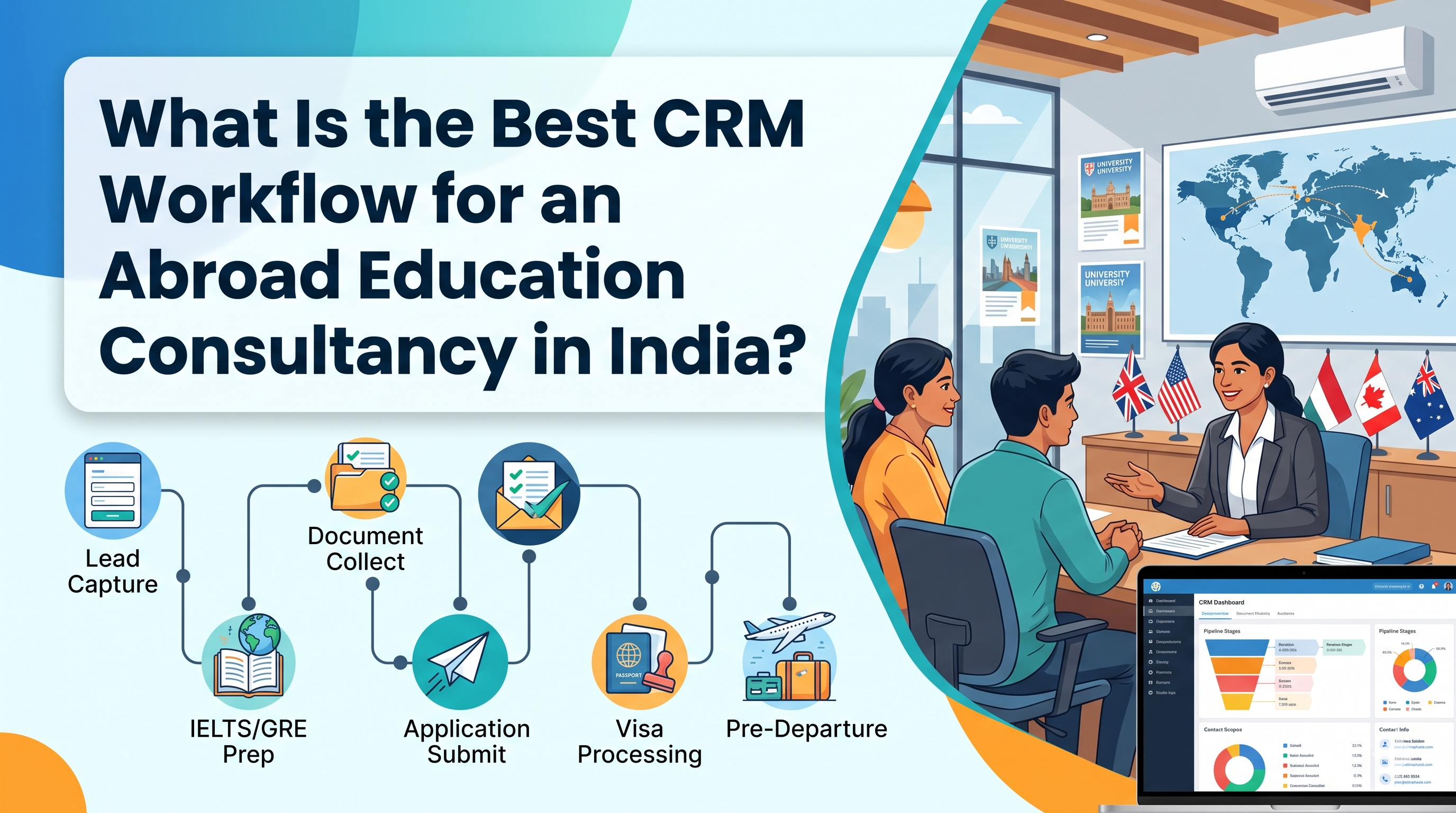
Keep the student profile separate from the application. The student profile holds name, contact details, academic history and test scores. Each application is a child record that holds the university, course, intake, country and stage. A student with four applications therefore has four independent progress bars, which is the only honest way to track multi-university work. This approach also matches how a CRM workflow for an abroad education consultancy in India is normally structured.
Step 2: Define the pipeline stages and exit rules
Use the stage table above, adjusted for your countries. Write the exit condition for every stage in plain language and share it with the whole team. When two counsellors disagree about what “ready to apply” means, your reports will disagree too.
Step 3: Attach a document checklist to each application
A checklist for a UK postgraduate application is different from a checklist for a US undergraduate application. Build checklist templates by country and course level, and let the CRM apply the right one when a counsellor creates the application. Each item should carry a status: requested, received, verified or rejected.
Step 4: Set deadline fields and automatic reminders
Add three dates to every application: internal document deadline, university application deadline and deposit or acceptance deadline. Then configure reminders to the counsellor and, where appropriate, to the student. If you want a fuller view of this idea, the guide on never missing student visa or university deadlines goes into it in detail.
Step 5: Log every update where the team can see it
Every university reply, student message and internal note should be logged against the application. Notes written once and visible to everyone replace the “let me check with her” delay. Strong follow-up management for study abroad consultants depends on exactly this habit.
Step 6: Automate the nudges, keep the human judgement
Let the system remind a student that a marksheet is still missing and tell a counsellor that a file has sat in “under review” for ten days. Keep decisions such as university selection, SOP review and visa strategy with your people. Automation should remove chasing, not counselling.
Step 7: Review progress in a weekly pipeline meeting
Open the pipeline view, filter by intake and walk through every file that has not moved in a week. A CRM turns this meeting from a memory test into a ten-minute review of exceptions.
Which CRM Features Matter Most for Application Progress Tracking?
The features that matter most are the ones that keep each application’s stage, documents, deadlines and communication in one record. Anything else is secondary when your goal is progress visibility.
| Feature | What it does for progress tracking | Question to ask a vendor |
|---|---|---|
| Application-level pipeline | Separate stage for each university application | Can one student have many applications with different stages? |
| Document checklists | Shows what is missing, received and verified | Can I build templates by country and course level? |
| Deadline reminders | Prevents missed submission and deposit dates | Can reminders go to counsellors and students? |
| Role-based access | Counsellors, documentation staff and sub-agents see only their files | Can I restrict by branch or team? |
| Activity timeline | Complete history of calls, messages and status changes | Is every update logged against the application? |
| Dashboards and reports | Shows bottlenecks by stage, country and counsellor | Can I filter by intake and university? |
| WhatsApp and email integration | Keeps conversations attached to the right file | Does the message log to the student record automatically? |
| Course and university database | Speeds up shortlisting and reduces data entry errors | Is the course finder connected to the application record? |
If you are comparing vendors, the CRM features that matter most for education consultants in India is a useful checklist, and what to ask a CRM provider before choosing software in India covers the questions that expose weak products early.
How Do You Track Applications Across Multiple Universities and Countries?
You track multi-university applications by treating each university application as its own record under one student profile, then using a single dashboard to compare them. This is where spreadsheets fail first and where a purpose-built CRM earns its cost.
Consider a realistic example. A student applies to two universities in Canada, one in Ireland and one in Germany. The Canadian files need proof of funds and a study permit plan. The Irish file needs a different set of academic documents. The German file has its own certification steps and a different timeline. If all of this sits in one row, the counsellor will lose track of which university is waiting on what.
With one record per application, the counsellor can:
- See all four applications on the student’s profile at a glance.
- Spot which application is closest to a deadline.
- Compare offers as they arrive and update the student on the full picture.
- Close out applications the student declines, so the pipeline stays clean.
For consultancies that handle many destinations at once, this guide on managing multi-country applications with SmartX CRM shows how the structure scales, and the university course finder CRM helps counsellors attach the right course to each application from the start.
How Does CRM Track Documents, Deadlines and Offer Letters?
A CRM tracks documents, deadlines and offer letters by storing them against the application record and giving each one a status and a date. The counsellor never has to search a chat history to find a passport scan or an offer letter.
Documents. Every required document has a status. Requested means you asked, received means the student sent it, verified means a staff member checked it, and rejected means it needs to be resubmitted with a reason. This four-status system alone removes most “did you get my marksheet?” calls. A dedicated document management module keeps files organised by student and application, so a documentation executive can work through a queue without asking counsellors for context.
Deadlines. Store university deadlines as real date fields, not notes. When a field is a date, the system can sort, filter and remind. A dashboard that lists all applications due in the next fourteen days is worth more than any amount of manual vigilance.
Offer letters. Log the offer type (conditional or unconditional), the conditions attached, the acceptance deadline and the deposit amount. Many consultancies lose control of a file right after the offer arrives, because the excitement hides the next set of tasks. A good CRM turns the offer into a new set of tasks: collect remaining documents, confirm acceptance, pay the deposit and request the visa document.
To decide which fields belong on the record in the first place, see what CRM data an abroad education consultancy in India should track.
How Does Application Tracking Connect to Visa Progress?
Application tracking connects to visa progress because an accepted offer is the trigger for the visa workflow. If your CRM stops at “offer received,” your team will go back to spreadsheets for the next, more time-sensitive phase.
The cleanest design is to let the application record spawn a visa record the moment the student accepts. That visa record inherits the student’s details and the university’s confirmation document, then adds its own checklist: financial documents, medical or biometric steps where relevant, interview preparation and filing date. A dedicated visa tracking view lets your visa team see every filing and decision in one place, and the wider visa management workflow keeps the handover from admissions to visa clean.
Consultancies that also handle immigration work can extend the same approach. The guide to visa and immigration CRM software explains how case tracking works in that setting.
How Can Counsellors, Sub-Agents and Students All See the Right Progress?
Each group should see the level of progress that matches its role. A counsellor needs the whole file. A documentation executive needs the checklist. A sub-agent needs the status of the students they referred. A student needs a clear list of what to do next.
Role-based access solves the first three. For sub-agents specifically, a B2B sub-agent management setup lets partners see only their own referrals and updates, which protects your student data while keeping partners informed. If your consultancy depends on a referral network, this is the difference between getting constant “any update?” messages and having partners check status on their own.
For students, communication matters as much as the data. When a document status changes or a university replies, a short message on the student’s preferred channel keeps them informed without a counsellor typing it manually. See how WhatsApp automation for education consultants can handle these routine updates, and make sure your CRM integrates cleanly with the tools your team already uses through its integration options.
Which Reports Show Whether Your Application Tracking Is Working?
The reports that matter show where applications get stuck, how long each stage takes and which counsellors or countries have the most pending files. Good reports turn tracking data into management decisions.
Start with these five views:
- Applications by stage. A funnel showing how many applications sit in each stage right now.
- Average time in stage. If “documents in progress” takes three times longer than “under review,” your bottleneck is internal, not the university.
- Applications by country and intake. This tells you where to hire, train or prepare ahead of a busy season.
- Aging files. Applications that have not changed stage in a set number of days.
- Counsellor workload and conversion. How many active applications each counsellor handles and how many reach offer and visa.
A dedicated reports module gives managers these views without asking staff to build a weekly spreadsheet. The habit to build is simple: review aging files every week, review stage conversion every month, and review country and intake demand every quarter.
What Mistakes Should You Avoid When Setting Up Application Tracking?
The most common mistakes are tracking at the wrong level, creating too many stages and letting data entry become optional. Each of these quietly breaks reporting.
- Tracking only the student, not the application. You will never see which university is the bottleneck.
- Building a 25-stage pipeline. Counsellors will skip stages, and the data will become unreliable. Ten to twelve clear stages is usually enough.
- Skipping exit rules. Without them, stage names mean different things to different people.
- Allowing documents to live outside the CRM. If WhatsApp is the real storage, your checklist will always be wrong.
- Ignoring data protection. Student passports, financial documents and test scores are sensitive. Use role-based access and read the education consultancy CRM data security guide before you upload files at scale.
- Migrating messy data. Clean duplicate students and old applications first. Otherwise you will carry yesterday’s chaos into a new system.
- No owner for the pipeline. Assign one person to keep stage definitions, checklists and reports healthy.
If you are still shortlisting software, the guide on how to choose the right CRM for an abroad education consultancy in India walks through the decision in more detail.
How Can You Roll Out Application Tracking in 30 Days?
You can roll out application tracking in about 30 days by working in four short phases: define, configure, migrate and run.
- Week 1, define. Agree on stages, exit rules, checklists per country and the three deadline fields.
- Week 2, configure. Build the pipeline, document templates, reminders and user roles in the CRM.
- Week 3, migrate and train. Import active applications only, then train counsellors on one workflow at a time.
- Week 4, run and review. Use the CRM as the only source of truth, hold the first weekly pipeline review and fix gaps.
Begin with current intake applications and leave closed files for later. A smaller, clean dataset adopts faster than a complete but messy one.
How Does SmartX CRM Help Education Consultants Track Application Progress?
SmartX CRM is built for study abroad and education consultancies, so application tracking sits at the centre of the product rather than being added on. Counsellors work from an application management view that organises each student’s applications, stages and tasks, while document, visa and reporting tools connect to the same records.
The Educa CRM product brings these pieces together for consultancies, with the course finder, sub-agent tools and visa workflow described above working from one student record. For teams that want to compare options first, the guide to the best study abroad CRM software in 2026 and the overview of the best CRM for an abroad education consultancy in India show what to look for. You can also review SmartX CRM pricing before speaking with the team.
The fastest way to judge fit is to see your own workflow in the product. Start a free demo and walk through one of your real applications, from shortlisting to visa.
Frequently Asked Questions
How can CRM software help Indian education consultants track student application progress?
CRM software gives each university application a stage, owner, document checklist and deadline. Counsellors update the stage as work is completed, and managers see every file’s status on a dashboard. This replaces scattered spreadsheets and chat threads with one reliable record per application.
What is the best way to track multiple university applications for one student?
Create one application record per university and course, all linked to a single student profile. Each application carries its own stage, documents and deadlines, so the counsellor can compare progress and spot the application closest to a deadline.
Which stages should a study abroad application pipeline include?
A typical pipeline includes shortlisting, documents in progress, ready to apply, submitted, under review, offer received, deposit and acceptance, visa preparation, visa decision and pre-departure. Adjust stages by country, and define a clear exit condition for each one.
Can a CRM track documents and deadlines for study abroad applications?
Yes. A CRM can store each document with a status such as requested, received, verified or rejected, and can hold university and deposit deadlines as date fields that trigger reminders. This keeps missing documents and approaching deadlines visible to the whole team.
Can sub-agents and students see application progress in a CRM?
Yes, when role-based access is configured. Sub-agents can see only the students they referred, and students can receive status updates or see a task list, while counsellors and managers keep full visibility of the file.
How long does it take to set up application tracking in a CRM?
Most consultancies can set up a working pipeline, checklists and reminders in about four weeks if they define stages and exit rules first. Starting with active intake applications keeps the migration manageable.
How is a CRM better than Excel for tracking student applications?
Excel stores data but cannot enforce stages, send reminders, restrict access by role or log every update against a file. A CRM does all four, which reduces missed deadlines and duplicate follow-ups, especially once a student has several applications.
Final Thoughts
Tracking student application progress is not a reporting problem. It is a structure problem. When each application has its own stage, checklist and deadline, progress becomes visible without extra meetings or manual updates. Start by naming your stages, move documents and deadlines into one record, and let automation handle the reminders. For a wider view of the platform, explore the SmartX CRM blog, read what CRM means in overseas consultancy, or contact the SmartX team to see application tracking in action.


Leave a comment: